SQL 문
SELECT 데이터 문을 사용하는 검색
기본 SELECT 문
select *
from departments;
select department_id, location_id
from departments;
산술 표현식
select last_name, salary, salary + 300
from employees;
Null 값 정의
- null은 사용할 수 없거나, 할당되지 않거나, 알 수 없거나, 적용할 수 없는 값입니다.
- null은 0또는 공백과는 같지 않습니다.
- 0은 숫자이고 공백은 문자입니다.
열(Column) Alias 정의
별칭을 정의함
select last_name as name, commission_pct as comm
from employees;
연결 연산자
- 두개의 문자열을 연결한다
- 문자열에 null값을 연결할 경우 결과는 문자열이다.
select last_name||job_id as "Employees"
from employees;
리터럴 문자열 사용
- 리터럴 값은 작은 따옴표로 묶어야한다.
select last_name ||' is a '||job_id as "Employee Details"
from employees;
대체 인용(q) 연산자
- 구분자를 임의로 저장한다.
- 가독성과 사용성 증가
select department_name || q'[Department's Manager Id: ]'|| manager_id as "Department and Manager"
from departments;
중복 행(Rows)
- 기본 표시는 중복행 포함
- distinct 사용하면 중복행 제거
- ex) 매니저들 중에서 같은 사원을 담당하는것 빼고 보고싶은 경우
select distinct department_id
from employees;
데이터제한 및 정렬
where
SELECT employee_id, last_name, job_id, department_id
FROM employees
WHERE department_id = 90;
- employees 테이블에서
- employee_id, last_name, job_id, department_id 이 컬럼을 볼건데
- department_id 는 department_id = 90; 이 조건으로 뽑아줘
문자열 및 날짜
- 문자열과 날짜는 홑따옴표로 감싸기
- 문자값은 대소문자 구분, 날짜값은 형식 구분
- 날짜 기본값은 ‘YY-MM-DD’ (나라마다 다름)
문자
select last_name, job_id, department_id
from employees
where last_name = 'Whalen';
날짜
select last_name
from employees
where hire_date = '23-07-17';
비교연산자
연산자의미
| = | 같음 |
| > | 보다 큼 |
| ≥ | 보다 크거나 같음 |
| < | 보다 작음 |
| ≤ | 보다 작거나 같음 |
| <> | 같지 않음 |
| in | 값 리스트 중 일치하는 값 검색 |
| like | 일치하는 문자 패턴 검색 |
| is null | null 확인 |
| between…and | 두 값 사이(경계값 포함) |
select last_name, salary
from employees
where salary <= 3000;
⇒ 월급이 3000보다 작거나 같은 사람과 그 사람의 월급을 출력
select last_name, salary
from employees
where salary betweeen 2500 and 3500;
⇒ 월급이 2500에서 3500사이(경계값 포함)인 사람과 그 사람의 월급 출력
select employee_id, last_name, salary, manager_id
from employees
where manager_id in (100, 101, 201)
⇒ 관리자 id 가 100, 101, 201인 직원과 그 직원의 이름, 관리자 id 출력
like
- 와일드카드 검색 수행
- % : 아무거나 와도 상관 없음
- _ : 하나의 문자만 와야함
select first_name
from employees
where first_name like 'S%';
⇒ 대문자 s로 시작하는 사람의 성 출력
select last_name
from employees
where last_name like '_o%';
⇒ 소문자 o가 두번째로 오는 사람의 이름 출력
만약 특수문자를 검색하고 싶다면? ESCAPE이용
select employee_id, last_name, job_id
from employees
where job_id like '%SA@_%' escape '@';
is null
- null을 테스트 하는 유일한 방법
select last_name, manager_id
from employees
where manager_id is null;
and, or
- and : 두 구성요소가 모두 참이어야함
select employee_id, last_name, job_id, salary
from employees
where salary >= 10000
and job_id like '%MAN%';
- or : 두 구성요소 조건중 하나가 참이어야함
select employee_id, last_name, job_id, salary
from employees
where salary >= 10000
or job_id like '%MAN%';
not
select last_name, job_id
from employees
where job_id not in ();
order by
- 정렬
- asc(기본값) : 오름차순
- desc : 내림차순
- oreder by 절은 무조건 가장 마지막에 옴
select last_name, job_id, department_id, hire_date
from employees
oreder by hire_date;
- 칼럼 번호로도 정렬 시킬 수 있음
select last_name, job_id, department_id, hire_date
from employees
oreder by 4;
치환변수
- 변수 만드는 기능
- & 유저가 값을 입력할 수 있도록 함
select employee_id, last_name, salary, department_id
from employees
where employee_id = &employee_num;
- 날짜 값이나 문자값에는 따옴표를 사용한다.
select last_name, department_name, salary*12
from employees
where job_id = '&job_title';
- 변수값을 재 사용 하려는 경우
select employee_id, last_name, job_id, &&column_name
from employees
oreder by &column_name;
단, 이 경우 변수값을 제거해줘야함(define)
- define, undefine
define employee_num = 200

select employee_id, last_name, salary, department_id
from employees
where employee_id = &employee_num;

undefine employee_num
단일 행 함수
대소문자 변환
- lower : 소문자 변환
- upper : 대문자 변환
- inicap : 앞글자만 대문자 변환(나머지는 소문자)
⇒ 보통 직원 이름이 소문자인지 대문자인지 헷갈릴 때 사용하면 좋다
select employee_id, last_name, department_id
from employees
where lower(last_name) = 'higgins';
문자조작함수
- concat(문자 합치기)
concat('hello', 'world') // helloworld
- substr : 문자 자르기
substr('helloworld',1,5) // hello
- length : 길이
- instr : 해당 단어가 몇번째 인덱스에 있는지 확인
instr('hellowolrd', 'w') // 6
- lpda / rpda : 각각 왼쪽, 오른쪽에 임의의 단어 넣기
lpda(salary,10,'*') // *****24000
- replace : 교체
replace('jack and jue', 'j', 'bl') // black and blue
- trim : 해당 단어 삭제
trim('h' from 'helloworld') // elloworld
숫자함수
- round : 반올림
- trunc : 소수점 삭제
- mod : 나머지
날짜
- 기본날짜 형식은 yy-mm-dd
- 확인법
select sysdate
from dual;
팁
- 일한 기간 주당 계산
select last_name, (sysdate-hire_date)/7 as weeks
from employees
where department_id = 90;
날짜 조작 함수
- months_between : 두 날짜간의 월 수
- add_months : 날짜에 월 추가
- next_day : 지정된 날짜의 다음날
- last_day : 월의 마지막날
- round : 날짜 반올림
- trunc : 날짜 자르기
변환함수 및 조건부 표현식
날짜에 to_char()
select employee_id, to_char(hire_date, 'mm/yy')
from employees
where last_name = 'higgins';
날짜 형식 모델의 요소
- fm : 포멧해서 날짜 앞에 0을 삭제 해줌
select last_name, to_char(hire_date, 'fmdd, month, yyyy') as hiredate
from employees;
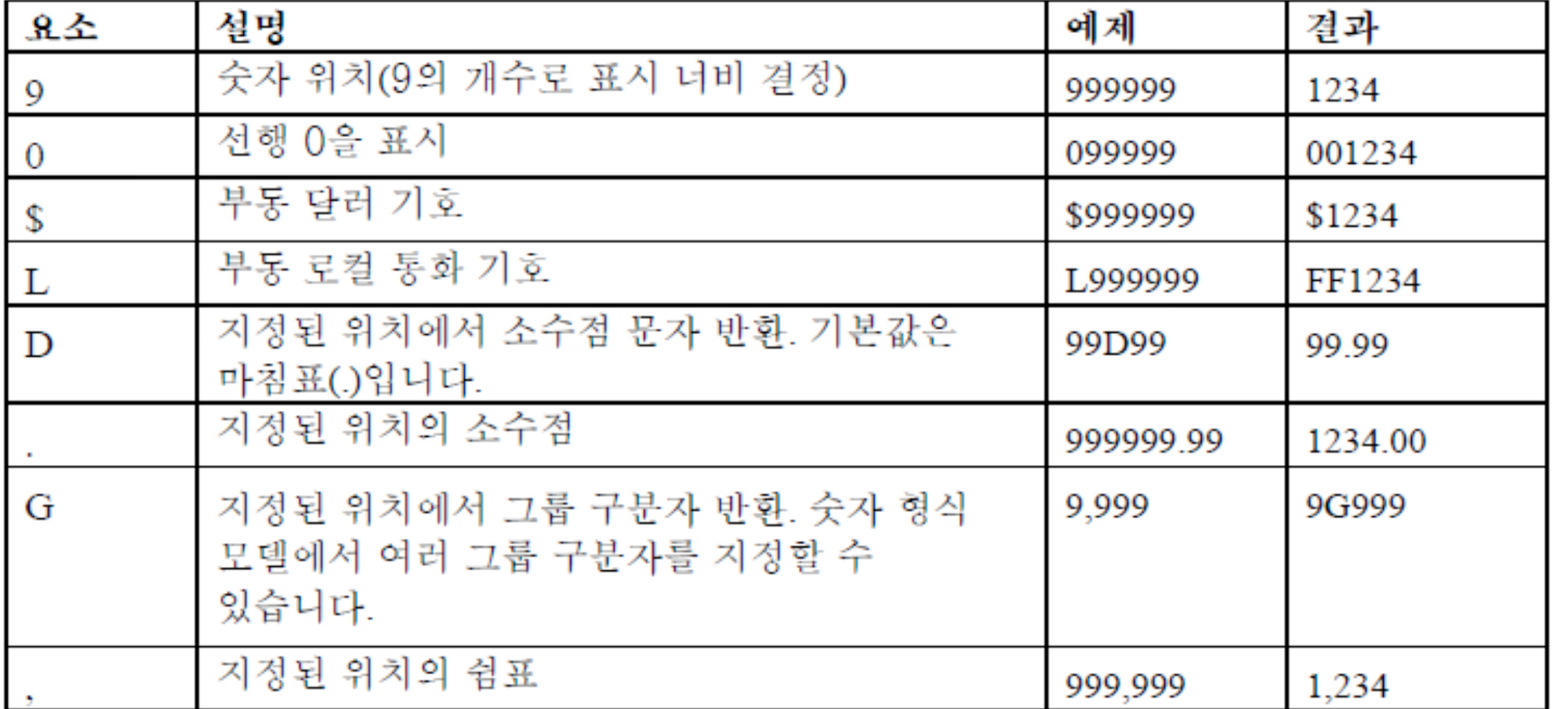
숫자에 to_char()
select to_char(salary, '$99,999.00') salary
from employees
where last_name = 'ernst';
일반함수
- nvl : 첫번째 값이 null이면 두번째 값 반환
- nvl2: 첫번째 값이 null이 아닌경우 두번째 값 반환 null일 경우 세번째 값 반환
- nullif : 두 표현식을 비교하여 같으면 null 반환, 같지 않으면 표현식 반환
- coalesce : 표현식 리스트에서 null이 아닌 첫번째 표현식 반환
조건부 표현식
case 식
select last_name, job_id, salary,
       case job_id when 'IT_PROG' then 1.10*salary
                   when 'ST_CLERK' then 1.15*salary
                   when 'SA_REP' then 1.20*salary
       else salry end "revise_salary"
from employees;
decode(오라클 전용)
select last_name, job_id, salary,
       decode(job_id, 'IT_PROG', 1.10*salary
                      'ST_CLERK' 1.15*salary
                      'SA_REP' 1.20*salary
              salary) revised_salary
from employees
그룹함수
- avg : 평군
- count : 개수
- max : 최대값
- min : 최소 값
- stddev : 표준편차
- sum : 합계
- variance : 분산
group by 절
그룹함수를 사용하여 그룹화 하였다면 group by 절에 꼭 컬럼명을 써줘야함!
select department_id, avg(salary)
from employees
group by department_id;
having을 이요한 그룹결과 제한
select department_id, avg(salary)
from employees
group by department_id;
having avg(salary) > 1700;
join
natural join
네추럴 조인은 알아서 같은 칼럼을 찾아 조인시켜줌(직접 정하지 못함!) 또한 자동으로 결합하기 때문에 데이터 유형이 맞아야함!
select department_id, department_name, location_id, city
from departments
natural join locations;
using
데이터 유형이 다를경우 사용!
select employee_id, last_name, location_id, department_id
from employees join departments
using department_id;
on
조인하는 컬럼 간의 임의 조건을 지정하거나 조인할 열을 지정한다
select e.employee_id, e.last_name, e.department_id, d.department_id, d.location_id
from employees e join departmens d
on (e.department id = d.department_id)
테이블 세개 join
두개 먼저 join 시키고 나머지 하나 join 시키면 된다.
select e.employee_id, l.city, d.department_name'
from employees e
join departments d
on d.departments = e.department_id
join locations l
on d.location_id, l.location_id
self join
한 테이블 끼리 조인시킬 수 있다. 이때 두개의 칼럼에 별칭을 지정해 그 별칭이 테이블 처럼 생각된다
select worker.last_name emp, manager.last_name mgr
from employees worker join employees manager
on (worker.manager_id = manager.employee_id);
nonequijoin
등호 외에 다른 연산자를 사용할때 쓴다
select e.last_name, e.salary, j.grade_level
from employees e join job_grandes j
on e.salary between j.lowest_sal and j.highest_sal;
left/right/full outer
null 값까지 모두 보고 싶을 때 사용한다 left와 right 의 기준은 from 절에서 오른쪽, 왼쪽 위치이다
full은 양쪽 모두 null 값까지 보고싶을 때 사용한다.
select e.last_name, e.department_id, d.department_name
from employees e left outer join departments d
on (e.department_id = d.department_id);
cross join
냅다 조인 시킨다
select name, department_name
from employees
cross join departments;
SELECT 데이터 문을 사용하는 검색
기본 SELECT 문
select *
from departments;
select department_id, location_id
from departments;
산술 표현식
select last_name, salary, salary + 300
from employees;
Null 값 정의
- null은 사용할 수 없거나, 할당되지 않거나, 알 수 없거나, 적용할 수 없는 값입니다.
- null은 0또는 공백과는 같지 않습니다.
- 0은 숫자이고 공백은 문자입니다.
열(Column) Alias 정의
별칭을 정의함
select last_name as name, commission_pct as comm
from employees;
연결 연산자
- 두개의 문자열을 연결한다
- 문자열에 null값을 연결할 경우 결과는 문자열이다.
select last_name||job_id as "Employees"
from employees;
리터럴 문자열 사용
- 리터럴 값은 작은 따옴표로 묶어야한다.
select last_name ||' is a '||job_id as "Employee Details"
from employees;
대체 인용(q) 연산자
- 구분자를 임의로 저장한다.
- 가독성과 사용성 증가
select department_name || q'[Department's Manager Id: ]'|| manager_id as "Department and Manager"
from departments;
중복 행(Rows)
- 기본 표시는 중복행 포함
- distinct 사용하면 중복행 제거
- ex) 매니저들 중에서 같은 사원을 담당하는것 빼고 보고싶은 경우
select distinct department_id
from employees;
데이터제한 및 정렬
where
SELECT employee_id, last_name, job_id, department_id
FROM employees
WHERE department_id = 90;
- employees 테이블에서
- employee_id, last_name, job_id, department_id 이 컬럼을 볼건데
- department_id 는 department_id = 90; 이 조건으로 뽑아줘
문자열 및 날짜
- 문자열과 날짜는 홑따옴표로 감싸기
- 문자값은 대소문자 구분, 날짜값은 형식 구분
- 날짜 기본값은 ‘YY-MM-DD’ (나라마다 다름)
문자
select last_name, job_id, department_id
from employees
where last_name = 'Whalen';
날짜
select last_name
from employees
where hire_date = '23-07-17';
비교연산자
연산자의미
| = | 같음 |
| > | 보다 큼 |
| ≥ | 보다 크거나 같음 |
| < | 보다 작음 |
| ≤ | 보다 작거나 같음 |
| <> | 같지 않음 |
| in | 값 리스트 중 일치하는 값 검색 |
| like | 일치하는 문자 패턴 검색 |
| is null | null 확인 |
| between…and | 두 값 사이(경계값 포함) |
select last_name, salary
from employees
where salary <= 3000;
⇒ 월급이 3000보다 작거나 같은 사람과 그 사람의 월급을 출력
select last_name, salary
from employees
where salary betweeen 2500 and 3500;
⇒ 월급이 2500에서 3500사이(경계값 포함)인 사람과 그 사람의 월급 출력
select employee_id, last_name, salary, manager_id
from employees
where manager_id in (100, 101, 201)
⇒ 관리자 id 가 100, 101, 201인 직원과 그 직원의 이름, 관리자 id 출력
like
- 와일드카드 검색 수행
- % : 아무거나 와도 상관 없음
- _ : 하나의 문자만 와야함
select first_name
from employees
where first_name like 'S%';
⇒ 대문자 s로 시작하는 사람의 성 출력
select last_name
from employees
where last_name like '_o%';
⇒ 소문자 o가 두번째로 오는 사람의 이름 출력
만약 특수문자를 검색하고 싶다면? ESCAPE이용
select employee_id, last_name, job_id
from employees
where job_id like '%SA@_%' escape '@';
is null
- null을 테스트 하는 유일한 방법
select last_name, manager_id
from employees
where manager_id is null;
and, or
- and : 두 구성요소가 모두 참이어야함
select employee_id, last_name, job_id, salary
from employees
where salary >= 10000
and job_id like '%MAN%';
- or : 두 구성요소 조건중 하나가 참이어야함
select employee_id, last_name, job_id, salary
from employees
where salary >= 10000
or job_id like '%MAN%';
not
select last_name, job_id
from employees
where job_id not in ();
order by
- 정렬
- asc(기본값) : 오름차순
- desc : 내림차순
- oreder by 절은 무조건 가장 마지막에 옴
select last_name, job_id, department_id, hire_date
from employees
oreder by hire_date;
- 칼럼 번호로도 정렬 시킬 수 있음
select last_name, job_id, department_id, hire_date
from employees
oreder by 4;
치환변수
- 변수 만드는 기능
- & 유저가 값을 입력할 수 있도록 함
select employee_id, last_name, salary, department_id
from employees
where employee_id = &employee_num;
- 날짜 값이나 문자값에는 따옴표를 사용한다.
select last_name, department_name, salary*12
from employees
where job_id = '&job_title';
- 변수값을 재 사용 하려는 경우
select employee_id, last_name, job_id, &&column_name
from employees
oreder by &column_name;
단, 이 경우 변수값을 제거해줘야함(define)
- define, undefine
define employee_num = 200

select employee_id, last_name, salary, department_id
from employees
where employee_id = &employee_num;

undefine employee_num
단일 행 함수
대소문자 변환
- lower : 소문자 변환
- upper : 대문자 변환
- inicap : 앞글자만 대문자 변환(나머지는 소문자)
⇒ 보통 직원 이름이 소문자인지 대문자인지 헷갈릴 때 사용하면 좋다
select employee_id, last_name, department_id
from employees
where lower(last_name) = 'higgins';
문자조작함수
- concat(문자 합치기)
concat('hello', 'world') // helloworld
- substr : 문자 자르기
substr('helloworld',1,5) // hello
- length : 길이
- instr : 해당 단어가 몇번째 인덱스에 있는지 확인
instr('hellowolrd', 'w') // 6
- lpda / rpda : 각각 왼쪽, 오른쪽에 임의의 단어 넣기
lpda(salary,10,'*') // *****24000
- replace : 교체
replace('jack and jue', 'j', 'bl') // black and blue
- trim : 해당 단어 삭제
trim('h' from 'helloworld') // elloworld
숫자함수
- round : 반올림
- trunc : 소수점 삭제
- mod : 나머지
날짜
- 기본날짜 형식은 yy-mm-dd
- 확인법
select sysdate
from dual;
팁
- 일한 기간 주당 계산
select last_name, (sysdate-hire_date)/7 as weeks
from employees
where department_id = 90;
날짜 조작 함수
- months_between : 두 날짜간의 월 수
- add_months : 날짜에 월 추가
- next_day : 지정된 날짜의 다음날
- last_day : 월의 마지막날
- round : 날짜 반올림
- trunc : 날짜 자르기
변환함수 및 조건부 표현식
날짜에 to_char()
select employee_id, to_char(hire_date, 'mm/yy')
from employees
where last_name = 'higgins';
날짜 형식 모델의 요소
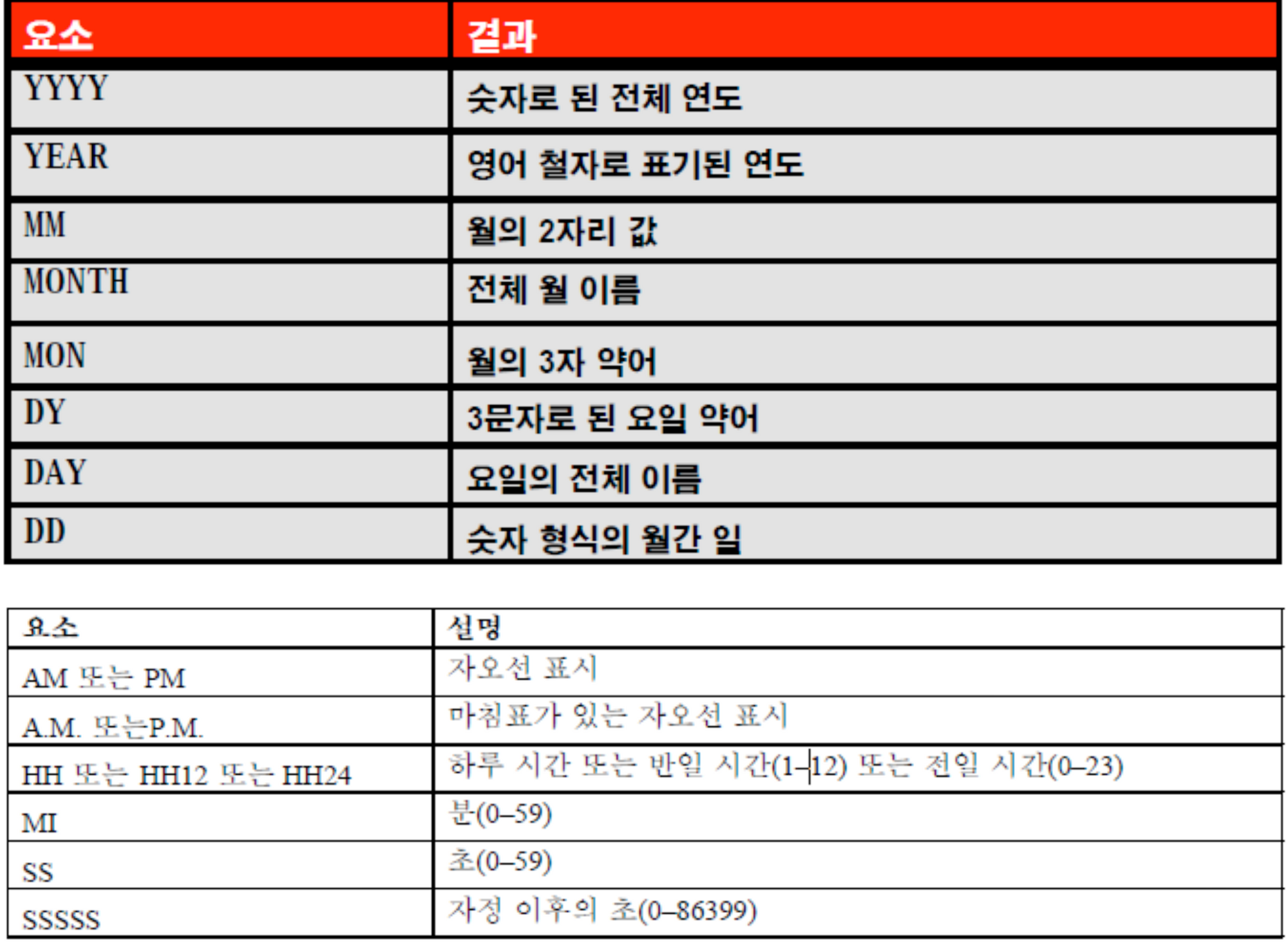
- fm : 포멧해서 날짜 앞에 0을 삭제 해줌
select last_name, to_char(hire_date, 'fmdd, month, yyyy') as hiredate
from employees;
숫자에 to_char()
select to_char(salary, '$99,999.00') salary
from employees
where last_name = 'ernst';
일반함수
- nvl : 첫번째 값이 null이면 두번째 값 반환
- nvl2: 첫번째 값이 null이 아닌경우 두번째 값 반환 null일 경우 세번째 값 반환
- nullif : 두 표현식을 비교하여 같으면 null 반환, 같지 않으면 표현식 반환
- coalesce : 표현식 리스트에서 null이 아닌 첫번째 표현식 반환
조건부 표현식
case 식
select last_name, job_id, salary,
       case job_id when 'IT_PROG' then 1.10*salary
                   when 'ST_CLERK' then 1.15*salary
                   when 'SA_REP' then 1.20*salary
       else salry end "revise_salary"
from employees;
decode(오라클 전용)
select last_name, job_id, salary,
       decode(job_id, 'IT_PROG', 1.10*salary
                      'ST_CLERK' 1.15*salary
                      'SA_REP' 1.20*salary
              salary) revised_salary
from employees
그룹함수
- avg : 평군
- count : 개수
- max : 최대값
- min : 최소 값
- stddev : 표준편차
- sum : 합계
- variance : 분산
group by 절
그룹함수를 사용하여 그룹화 하였다면 group by 절에 꼭 컬럼명을 써줘야함!
select department_id, avg(salary)
from employees
group by department_id;
having을 이요한 그룹결과 제한
select department_id, avg(salary)
from employees
group by department_id;
having avg(salary) > 1700;
join
natural join
네추럴 조인은 알아서 같은 칼럼을 찾아 조인시켜줌(직접 정하지 못함!) 또한 자동으로 결합하기 때문에 데이터 유형이 맞아야함!
select department_id, department_name, location_id, city
from departments
natural join locations;
using
데이터 유형이 다를경우 사용!
select employee_id, last_name, location_id, department_id
from employees join departments
using department_id;
on
조인하는 컬럼 간의 임의 조건을 지정하거나 조인할 열을 지정한다
select e.employee_id, e.last_name, e.department_id, d.department_id, d.location_id
from employees e join departmens d
on (e.department id = d.department_id)
테이블 세개 join
두개 먼저 join 시키고 나머지 하나 join 시키면 된다.
select e.employee_id, l.city, d.department_name'
from employees e
join departments d
on d.departments = e.department_id
join locations l
on d.location_id, l.location_id
self join
한 테이블 끼리 조인시킬 수 있다. 이때 두개의 칼럼에 별칭을 지정해 그 별칭이 테이블 처럼 생각된다
select worker.last_name emp, manager.last_name mgr
from employees worker join employees manager
on (worker.manager_id = manager.employee_id);
nonequijoin
등호 외에 다른 연산자를 사용할때 쓴다
select e.last_name, e.salary, j.grade_level
from employees e join job_grandes j
on e.salary between j.lowest_sal and j.highest_sal;
left/right/full outer
null 값까지 모두 보고 싶을 때 사용한다 left와 right 의 기준은 from 절에서 오른쪽, 왼쪽 위치이다
full은 양쪽 모두 null 값까지 보고싶을 때 사용한다.
select e.last_name, e.department_id, d.department_name
from employees e left outer join departments d
on (e.department_id = d.department_id);
cross join
냅다 조인 시킨다
select name, department_name
from employees
cross join departments;